

License Usage
The USAGE page displays the number of Licenses purchased.
To view the License usage:
Select Admin > Advanced > License > Usage. The USAGE page is displayed.
To view the Licenses available for any Module, select Feature from the dropdown list.
Select the Edition from the dropdown list. System displays the below mentioned information:
Validity of the Licenses
List of features
Total number of Purchased Licenses
Total number of Consumed Licenses
Total number of Available Licenses
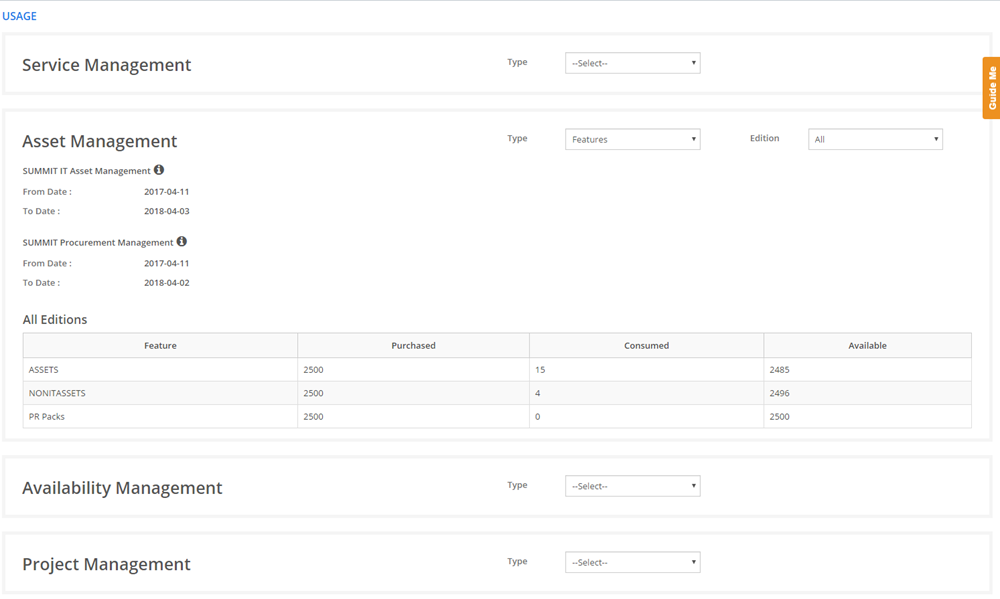
Figure: USAGE page
The following table describes the fields on the USAGE page:
| Fields | Description |
| All Editions | |
Feature |
Displays the particular feature names of the SUMMIT application purchased by the organization. |
Purchased |
Displays the number of license are purchased for a feature of the SUMMIT application. |
Consumed |
Displays the number of license consumed of the particular feature. |
Available |
Displays the number of available license of the particular feature. |